prayer lock: christian focus
- 4.8
- Rating
- 10.00K
- Installs
- Free
- Price
 Analysis by App-foxy
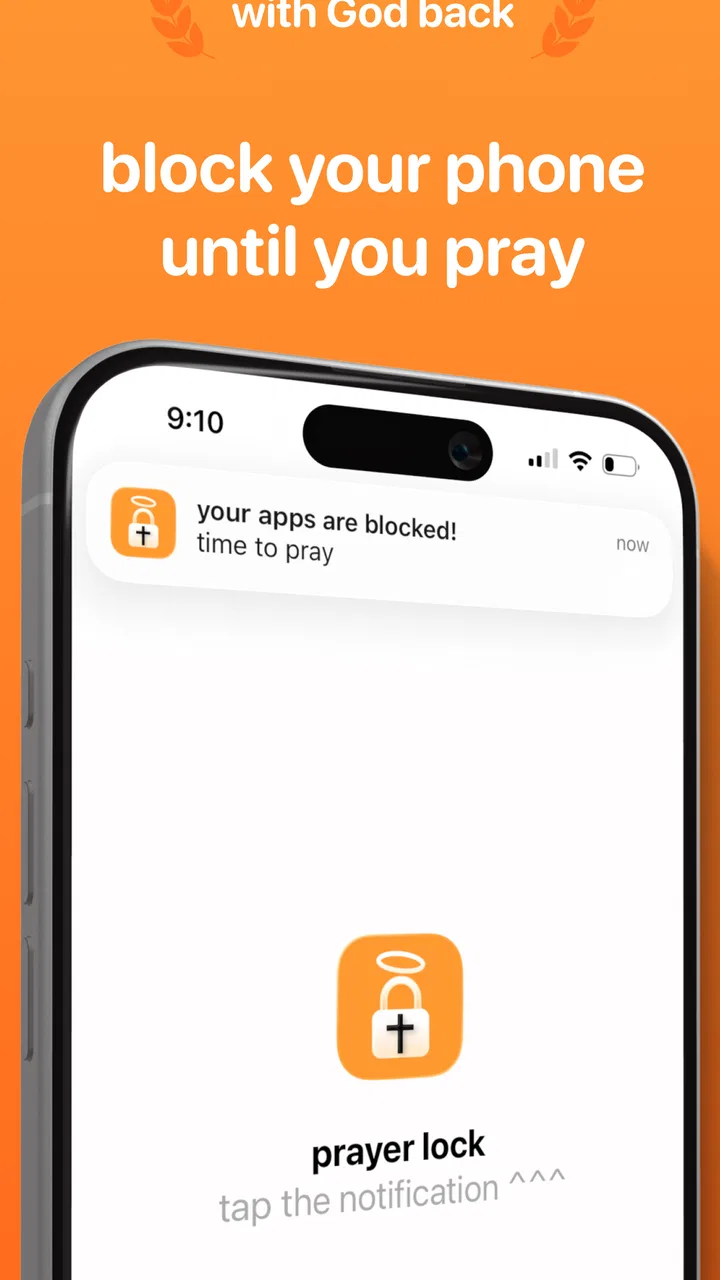
I approached prayer lock: christian focus as a practical Books & Reference app rather than another general productivity timer. Its central idea is simple: it places a barrier between you and selected apps until you pray. That makes the experience less about collecting tasks or watching a productivity score and more about creating a deliberate pause before distraction. In my experience, that narrow purpose is both its strongest quality and the main thing you need to understand before installing it.
The app comes from Covenant Studios LLC and is free to install, with optional in-app purchases ranging from $0.49 to $44.99 per item. It is rated for Everyone, runs on Android 8.0 or later, and its current version is 4.1.0. The listing shows a 4.8 average from around 5,200 ratings, with more than 10,000 installs. Those figures suggest that the concept has found a focused audience, but they do not make it a universal solution. The real question is whether a prayer-based interruption fits your habits, beliefs, and daily responsibilities.
How the reading and navigation experience feels
The most important design choice is that the app asks you to engage with prayer before returning to blocked apps. That gives the interface a clear purpose: it is not trying to become a full Bible reader, a social community, or an all-purpose habit manager. I found that clarity helpful because there are fewer competing ideas to learn. You install it, decide which distractions need a pause, and treat the lock as a prompt to slow down.
You May Also Like

 Blood Strike: 2.5 Anniversary
Blood Strike’s Loadouts Turn Every Drop Into a Tactical Gamble
A close look at Blood Strike’s custom loadouts: how fast access to signature weapons reshapes its battle royale rhythm, rewards preparation, and narrows the gap between fights.

 Pandora - Music & Podcasts
Pandora’s Music Is Easy to Start, but Harder to Recover
Pandora’s strength is its low-effort path from a seed to a station. Its weak spot is how much confidence it asks you to place in connection, setup, and quiet recovery.

 8 Ball Pool
 Is Built on Rivalries, Rematches, and Routine
A close look at the rivalries, rematches, shared routines, and unanswered safety questions that turn a quick pool match into a persistent mobile community.

 Samsung Music
’s Quiet Strength Is Playing What You Already Own
Its reach comes less from spectacle than from dependable access to a personal library. That simplicity is both the app’s strongest retention engine and its ceiling.

 AccuWeather: Weather Radar
AccuWeather Review: A Quick, Clear Forecast for Everyday Decisions
For everyday plans, the best forecast is the one you can understand quickly. AccuWeather makes rain timing, radar, and local conditions easy to act on, with a few trade-offs.

 Hill Climb Racing
Why Hill Climb Racing Still Turns Crashes Into One More Run
A tiny car, a bumpy hill and one more upgrade: Hill Climb Racing keeps resurfacing because its simple chaos makes every near-miss feel personal.
More From Our News Desk
View All News


For someone who prefers straightforward screens, this approach should feel easier to understand than a productivity app filled with charts, streaks, categories, and reminders. The wording is also likely to be more meaningful for a Christian user than a generic message asking them to “stay focused.” The spiritual action is not decoration; it is the mechanism that gives the interruption its purpose.
That same focus can create a learning curve for people who expect a conventional app blocker. A typical digital-wellbeing tool usually explains its limits in terms of time, schedules, or usage totals. Here, the important mental model is different: access is connected to prayer. If you are looking for a neutral blocker that treats every app and every moment the same, this may initially feel unusual rather than intuitive.
I would recommend setting it up during a calm moment instead of installing it just before an important appointment. A prayer lock changes the path to apps you normally open automatically, so you should first decide which apps genuinely cause problems. Blocking everything at once may turn a helpful spiritual cue into an annoying obstacle. Starting with one or two habitual distractions makes it easier to judge whether the method works for you.
Readability matters more than decoration
Because the app is built around a short, purposeful interaction, readable text and obvious controls matter more than visual polish. A person who has difficulty reading small text, distinguishing low-contrast elements, or processing crowded screens benefits from a simple flow with one clear next action. I would still check the display at your normal font size before relying on it, especially if you use enlarged system text or a display that is difficult to see outdoors.
The app’s spiritual language may also improve comprehension for the intended audience. “Pray before opening this” communicates a concrete action, while a vague productivity warning can require more interpretation. On the other hand, users who are new to Christian terminology may need extra time to understand what the app expects from them. That is not necessarily a flaw, but it reinforces that this is a faith-specific tool, not a general accessibility solution for digital distraction.
A useful workflow is to keep the first setup intentionally small. Choose a familiar app that you open out of habit, test the lock when you are not in a hurry, and notice whether the prompt is readable without squinting or repeated tapping. If the interaction feels comfortable, expand gradually. This approach is particularly useful for people who become overwhelmed by configuration screens or who need to learn one change at a time.
Motor, sensory, and cognitive considerations
Any app that interrupts an automatic phone gesture deserves to be judged by more than its idea. A prayer lock can help someone who wants a pause before opening a distracting app, but the pause must remain manageable for users with different motor, sensory, or cognitive needs. Repeated tapping, precise touch targets, unexpected transitions, or a prompt that disappears too quickly could make the experience harder than intended.
For users with limited dexterity, the best strategy is to avoid creating a large list of blocked apps immediately. Every additional blocked destination creates another possible interruption, and each interruption may require the same physical action. Keeping the list focused lowers the number of times you need to interact with the lock and makes the habit more predictable.
People with tremors or reduced touch precision may also prefer using the app when seated and unhurried, rather than while walking or carrying something. A prayer-based pause is most useful when it can be completed deliberately. If you are trying to open a map, contact someone quickly, or handle a time-sensitive task, a lock that demands attention can become a safety or convenience issue. That is a reason to choose blocked apps carefully, not a reason to treat the app as a failure.
For sensory-sensitive users, an interruption can be beneficial when it is calm and consistent, but frustrating when it arrives unexpectedly. I would avoid placing essential communication tools behind the lock until you understand exactly how the experience affects your routine. Social media, short-video apps, and games are more sensible starting points because the interruption is less likely to interfere with an urgent need.
The cognitive side is especially interesting. The app replaces an automatic impulse with a small ritual. That can work well for someone who needs an external cue to notice what they are doing. Instead of asking you to resist a habit through willpower alone, it creates a moment in which you can choose whether opening the app still makes sense. The trade-off is that the ritual may feel repetitive if you are already disciplined or if you only wanted a temporary time limit.
I also see value for people who find numerical tracking stressful. Many focus tools turn self-control into a contest involving minutes, streaks, or completed sessions. This app offers a different kind of feedback: the success is the pause itself and the prayer that accompanies it. That may feel gentler for users who dislike gamified pressure. It will not satisfy someone who wants detailed reports about usage patterns, though, because the spiritual prompt is the main experience rather than a data dashboard.
Why the prayer step changes the usual blocker formula
The non-obvious strength here is that the app changes the emotional meaning of interruption. A normal blocker can feel like a restriction imposed by software. A prayer lock can feel more like a personal commitment, especially if the user has chosen it as part of a daily faith practice. That distinction matters: people are often more willing to keep a boundary when it reflects a value they already care about.
It also creates a useful test for intention. Suppose I pick up my phone to open a social network during a quiet morning. The prompt gives me a choice: pray first, or recognize that I am reaching for the app automatically. Even if I decide not to continue, the interruption has done something valuable by making the impulse visible. A conventional timer may tell me that I have spent too long online; this app challenges the decision before the session begins.
There is a limitation built into that strength. The app is not likely to help someone whose main problem is scheduling, work focus, or excessive phone use across many unrelated categories. The prayer step may be meaningful, but it does not replace a calendar, a task manager, or a detailed digital-wellbeing report. I would pair it with those tools only if you need their specific functions, rather than expecting one app to cover every kind of distraction.
Situational access in everyday life
The clearest everyday use case is a person who repeatedly opens a distracting app during moments intended for prayer, study, or rest. Imagine preparing for a short devotional period after breakfast. Instead of opening a social feed first and losing the time, the lock creates a deliberate checkpoint. You can pray, decide what you actually want to do, and then continue. The value comes from changing the first few seconds of the routine.
It could also suit a household where one person wants a personal boundary without imposing a device-wide rule on everyone else. Because the motivation is religious rather than purely technical, the user can explain the practice in personal terms: “I want to pray before I open this.” That is different from asking another person to enforce a password or monitor screen time.
Students and remote workers may find it useful during transitions. Before beginning a reading session, they can place the most tempting entertainment apps behind the prayer step. The app will not organize the study material or prevent every distraction, but it can make the first escape route less automatic. For someone who already prays regularly, the connection may feel more natural than a generic focus mode.
Situational access becomes more complicated when the phone is needed in a hurry. A blocked messaging app could be inconvenient if you are responding to a family member, coordinating transport, or dealing with an urgent situation. I would keep emergency communication, navigation, health-related tools, and other essential services outside the lock unless you have tested the arrangement carefully. The right setup is not the one that blocks the most; it is the one that blocks the distractions without making the phone unreliable.
Travel and poor connectivity can also affect how comfortable you feel relying on any spiritually themed digital routine, even though the core idea is simple. Before using it during a trip, I would test the lock and prayer flow in the exact way you expect to use them. A short trial at home can reveal whether the app fits your device settings, your accessibility preferences, and your normal hand position.
Parents and caregivers should be cautious about treating the app as a substitute for conversation. Its Everyone rating makes it broadly suitable from a content perspective, but a prayer lock is still a personal discipline tool. A child may understand the prompt differently from an adult, and a forced religious routine can produce resistance instead of reflection. It works best when the person using it understands the purpose and participates willingly.
Remaining barriers and practical trade-offs
The biggest barrier is relevance. If Christian prayer is not part of your life, the central interaction will not feel motivating. A standard focus mode, app timer, or distraction blocker will probably be a better choice because those tools can work without a faith commitment. This app should not be judged as a replacement for every alternative; it is designed around a particular relationship between technology and prayer.
Another barrier is the possibility of overblocking. A person who wants strict control may be tempted to protect many apps at once, but that can make ordinary phone use tiring. The more often the lock appears, the more likely it is to become background friction. I would review the blocked list after a few days and remove anything that does not represent a real distraction. A smaller boundary is usually easier to respect than an ambitious one that interferes with normal tasks.
There is also a difference between an intentional pause and a mechanical ritual. If you rush through the prayer simply to reach an app, the lock may become another button to press rather than a meaningful moment. That does not mean the concept is ineffective; it means the user has to decide what “pray first” should mean in practice. A short, sincere pause may be enough, while someone else may want a longer devotional habit. The app can prompt the choice, but it cannot create personal meaning on its own.
Users who need extensive accessibility customization should approach it with realistic expectations. System-level features such as larger text, screen readers, switch access, voice control, and reduced-motion preferences may help, but the quality of the experience will depend on how the app’s own screens behave with those settings. I would test the complete path before making it part of an important routine. In particular, check whether you can activate the controls comfortably, understand each prompt, and recover from an accidental tap.
Version 4.1.0 gives the app a current, defined release to install, while the free entry point makes experimentation relatively easy. The optional purchases are worth considering before committing to a long-term setup, especially if you are trying to keep the experience simple and predictable. I would first use the free version to establish whether the prayer interruption genuinely changes your habits. Paying for more should make sense only if the available options support a routine you already value.
Finally, the app is not a substitute for personal boundaries outside the phone. If distraction comes from a browser, another device, constant notifications, or an environment that encourages interruptions, a prayer lock can address only one part of the problem. Its strongest use is as a precise checkpoint for selected apps, not as a complete answer to digital overload.
My inclusive verdict
I like the idea because it respects a specific motivation instead of disguising a generic blocker with religious wording. For a Christian user who wants prayer to shape the way they approach distracting apps, this can be a more personal and memorable intervention than a countdown timer. It is especially promising for people who benefit from a clear pause, dislike competitive productivity systems, or want their focus habits to reflect their faith.
From an inclusion standpoint, its simplicity may help users who prefer uncluttered interactions and a single understandable purpose. The prayer step can also support cognitive awareness by interrupting automatic behavior before it becomes a long session. At the same time, people with motor or sensory needs should test the actual controls with their usual device settings, and anyone who depends on rapid access should keep essential apps outside the lock.
My practical recommendation is to start narrowly: protect one genuinely distracting app, use the lock during a calm part of the day, and observe whether the pause feels meaningful or merely inconvenient. If it helps you notice your intention and return to what matters, expand the habit slowly. If you need detailed schedules, usage reports, neutral language, or instant access to every app, a conventional focus tool will be a better fit.
Overall, I see prayer lock: christian focus as a focused spiritual habit aid, not a universal productivity product. Its value depends less on how many apps it can stand between you and, and more on whether prayer is a sincere part of the decision you want to make. For the right user, that is a thoughtful and distinctive approach; for everyone else, the usual digital-wellbeing alternatives will likely be clearer and more flexible.
FAQs for prayer lock: christian focus
01What is Prayer Lock: Christian Focus, and how does it work?
Prayer Lock: Christian Focus is an app designed to help Christians enhance their spiritual practice by providing a dedicated space for prayer and meditation. The app locks your phone, minimizing distractions, and offers guided prayers, scripture readings, and meditative music to help users focus on spiritual growth and mindfulness.
02Is Prayer Lock: Christian Focus available for both Android and iOS devices?
Yes, Prayer Lock: Christian Focus is available for download on both Android and iOS platforms. Users can find the app on the Google Play Store and the Apple App Store, ensuring accessibility for a wide range of smartphones and tablets.
03Are there any in-app purchases or subscription fees?
Prayer Lock: Christian Focus offers a free version with basic features. However, there are in-app purchases and subscription options that unlock additional content, such as premium prayers, exclusive meditation tracks, and customizable themes, providing a more enriched spiritual experience for users.
04Can I customize the prayer and meditation content in the app?
Yes, users can customize their experience by selecting specific prayers, scriptures, and meditation tracks that align with their personal spiritual journey. The app allows for personalization, enabling users to build a routine that best suits their practice and preferences.
05How can Prayer Lock: Christian Focus help improve my spiritual routine?
Prayer Lock: Christian Focus aids spiritual development by minimizing digital distractions and providing structured, guided content. With features like daily reminders, the app encourages consistency and helps users cultivate a deeper, more focused prayer life, fostering personal growth and a stronger connection to their faith.
Pros
- Simple interface for easy navigation.
- Customizable prayer reminders.
- Offline access for convenience.
- No ads to distract during use.
- Variety of prayer themes available.
Cons
- Limited features in free version.
- Some users report occasional crashes.
- No social sharing options.
- Requires frequent updates.
- Limited language support.

prayer lock: christian focus
Gallery